MinerU is an open-source document parser from OpenDataLab, the open-data group at Shanghai Artificial Intelligence Laboratory [1]. It converts PDFs, images and Microsoft Office files into Markdown, a plain-text format with simple marks for headings, lists and tables. It can also produce JSON that records the page layout.
We installed MinerU 4.0 on a laptop and ran it on five documents: an arXiv preprint in mathematics, a SIGMOD paper on data management, MinerU’s own paper, a photographed page and a typeset dictionary sample.
Our results show that MinerU produces results that are clearly superior to simple PDF-parsing baselines, respecting much more of the underlying content and structure. This makes it a useful module for any application that relies on the accurate comprehension of unstructured data .
Why not just extract the text?
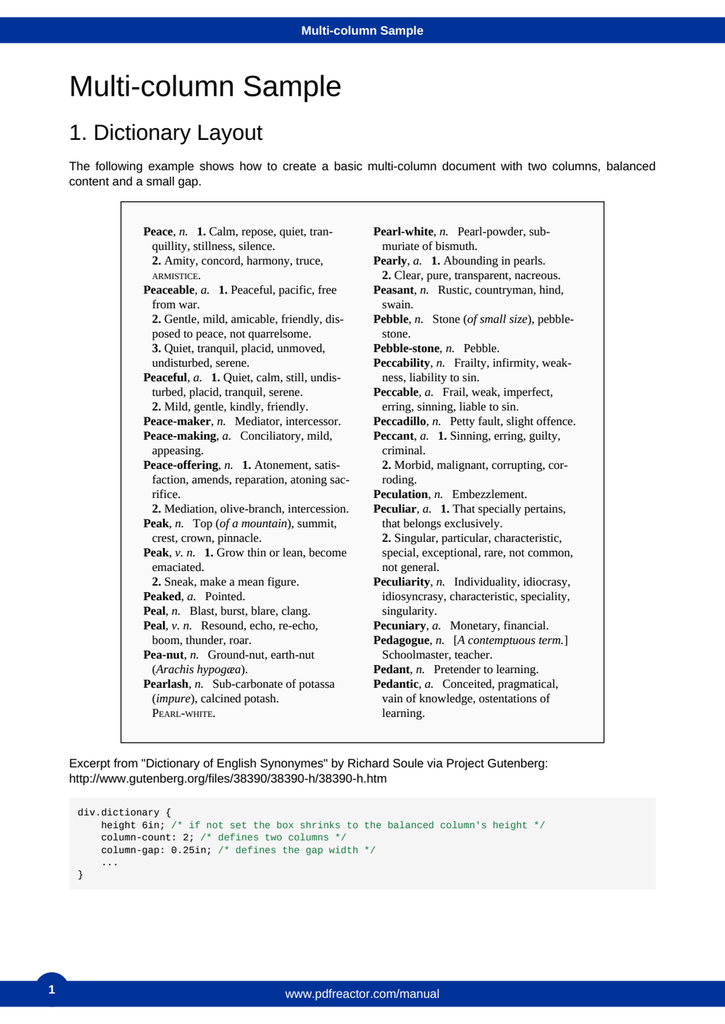
We use one page throughout the article to make the problem concrete: the first page of the dictionary sample, which we call the dictionary page (Figure 1). At the top, a blue bar holds the running head, a line repeated on every page. The same phrase appears underneath as the document title. The main part of the page is a list of dictionary entries in two columns. At the bottom are a page number and a short block of CSS, the code used to style web pages. From this page we want the entries in reading order, the CSS kept as code, and no running head or page number in the text.
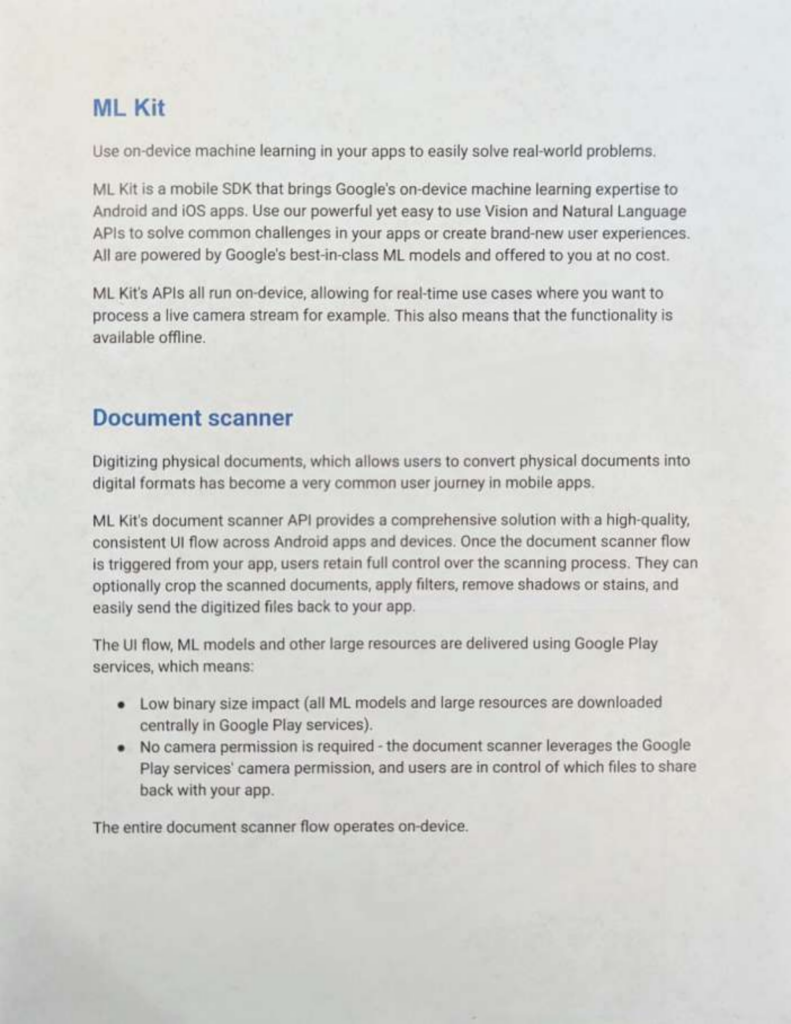
Our second example is the photographed page, a printed page from Google’s ML Kit documentation that was photographed with a phone and saved as a PDF (Figure 2).
As a baseline, we ran both pages through pypdfium2, a Python library that extracts the text stored in a PDF. A PDF usually stores a page as many small pieces of text, each with its own position. pypdfium2 returns them in the order the file lists them, which is not always the order a person reads them.
On the photographed page, pypdfium2 returned zero characters. That is expected because the PDF contains only an image and no text layer for an extractor to read. It returned an empty string with no warning and no error.
On the dictionary page, it returned 2,707 characters, but in the wrong order. It listed 29 headwords, the words being defined, from Peace, n. to Pedantic, a., before giving the first definition. Its first lines were:
Multi-column Sample
Peace, n.
Peaceable, a.
Peaceful, a.
Peace-maker, n.
   ... 24 more headwords ...
Pedantic, a.
Multi-column Sample
1. Dictionary Layout
The following example shows how to create a basic multi-column document
1. Calm, repose, quiet, tran?quillity, stillness, silence.
The output has three problems:
- The definition of
Peaceappears only after all 29 headwords. Multi-column Sampleappears twice, because the extractor cannot tell the running head from the title.tranquillitycontains a?, our mark for a character the extractor could not read, at the point where the word breaks across two lines in Figure 1. MinerU returned the word correctly.
Apart from that character, all the text is present. The problem is the structure: which column a line belongs to, and which repeated line is a running head rather than a title. MinerU is designed to recover that structure, along with tables, equations and captions [1]. We tested it on the five documents listed in Table 1.
What is MinerU?
Instead of reading the text stored in the PDF, MinerU works from what the page looks like. It turns each page into an image, finds the parts of the page, and sends each part to a model built for that kind of content. A model here is a neural network trained for a particular task. An equation, for example, goes to a model that writes it out as LaTeX.
The first step, layout detection, divides the page into regions and labels each one. For the dictionary page, it produced these labels:
header           "Multi-column Sample"
paragraph_title  "Multi-column Sample"
paragraph_title  "1. Dictionary Layout"
text             "The following example shows how to create a basic..."
ref_text         "Peace, n.1. Calm, repose, quiet, tranquillity..."   (x29 entries)
text             "Excerpt from "Dictionary of English Synonymes" by..."
footer           "div.dictionary {height 6in; /* if not set the box..."
page_number      "1"
footer           "www.pdfreactor.com/manual"
The label determines how each region is processed next:
text,ref_textandparagraph_titleregions go through optical character recognition (OCR), which reads characters from the image rather than from the PDF’s stored text. OCR is how MinerU reads the photographed page.equationregions go to a formula model, which writes LaTeX.tableregions go to a table model. It writes HTML, the markup language used for web pages, when cells span several rows or columns, and a Markdown table otherwise.imageandchartregions are cut out of the page and kept as pictures.header,footerandpage_numberregions are discarded.
Only two of these apply to the dictionary page: OCR and discarding. Regions are discarded based on their labels. That keeps running heads and page numbers out of the text, but it can also remove content that was given the wrong label. Two regions on the dictionary page are labelled footer: the web address at the bottom, which is a real footer, and the CSS listing, which is not. MinerU discarded both.
This is the first part of MinerU’s Markdown output for the dictionary page:
## Multi-column Sample

## 1. Dictionary Layout

The following example shows how to create a basic multi-column document
with two columns, balanced content and a small gap.

Peace, n.1. Calm, repose, quiet, tranquillity, stillness, silence. 2.
Amity, concord, harmony, truce, ARMISTICE.
Unlike the pypdfium2 output, this one puts the first definition straight after its headword, keeps tranquillity intact, and prints the title only once. The running head was labelled header and discarded. The title was labelled paragraph_title and kept.
How much of this processing runs depends on a setting called the tier. We used the default for PDFs, standard, which adds a vision-language model, a larger model that reads image and text together, for regions the single-task models cannot resolve.
How we tested it
We chose five documents, each testing a different part of PDF parsing (Table 1). The arXiv preprint [2] is a mathematics paper with many fraktur letters. Fraktur is a Gothic-style alphabet that mathematicians use for some symbols. The SIGMOD paper [3] is from the ACM SIGMOD conference on data management.
| Document | Pages | What it tests |
|---|---|---|
| Dictionary sample | 6 | Reading order across two columns |
| arXiv preprint [2] | 61 | Dense mathematics and fraktur letters |
| SIGMOD paper [3] | 25 | Figures and captions |
| Photographed page | 1 | OCR on a page with no text layer |
| MinerU’s own paper [4] | 57 | A long paper with many figures and tables |
| Total | 150 |
Table 2 lists the machine and software we used..
| Item | Value |
|---|---|
| Machine | Apple M5 Pro, 48 GB unified memory, arm64 |
| Acceleration | GPU via Apple Metal (device=mps) for the small models, llama.cpp for the vision-language model |
| MinerU | 4.0.0, reported by mineru version --json |
| Python | 3.13.15, in a uv virtual environment |
| Tier | standard: the single-task models plus a 1.2-billion-parameter vision-language model |
| Date | 17 September 2026 |
We used the default settings, with no configuration file and no tuning.
By default MinerU writes each figure into the Markdown file as base64, a way of encoding an image as text. MinerU’s own paper produced a single 17 MB Markdown file that way. With --format zip, MinerU saves the 117 figures as separate JPEG files and the Markdown file drops to 193 KB.
What it got right
MinerU kept the dictionary sample’s two columns in reading order. In Figure 1, Pearlash ends the left column and Pearl-white starts the right one. MinerU’s output keeps them in that order, each with its own definition:
Pearlash, n. Sub-carbonate of potassa (impure), calcined potash. PEARL-WHITE.

Pearl-white, n.Pearl-powder, submuriate of bismuth.
Running heads, footers and page numbers stayed out of the dictionary sample’s Markdown. Across the six pages, MinerU labelled 6 headers, 7 footers and 6 page numbers and discarded them all, so neither the web address nor the page numbers appear in the output. One of the footers was the CSS listing described in “Where it breaks”.
MinerU read every word on the photographed page correctly. It also marked the two blue headings in Figure 2, ML Kit and Document scanner, as Markdown headings.
MinerU correctly rebuilt a table with a two-level header and sideways row labels. The table comes from MinerU’s own paper and is shown in Figure 3. In its header, Stage-0 spans two sub-columns, a and b. Down the left side, four group labels, Vision, Data, Model and Training, are printed sideways.
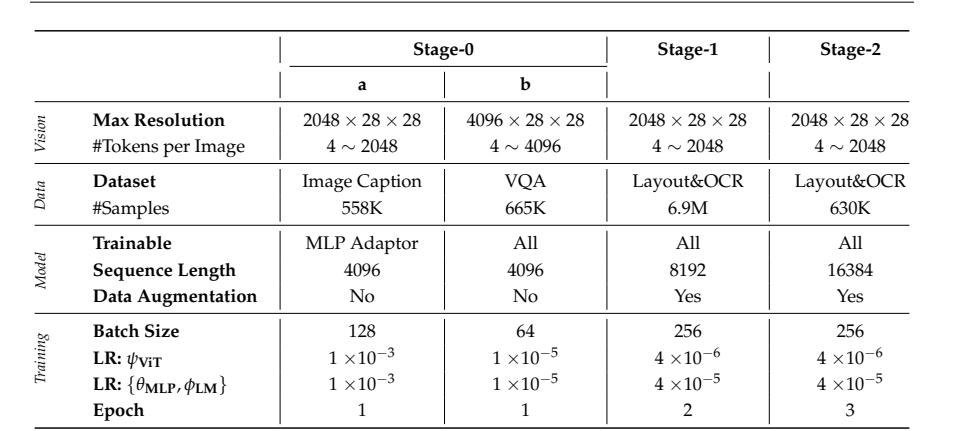
MinerU returned the table as HTML. The start of its output, reformatted for reading, is:
<table>
  <tr>
    <td rowspan="2" colspan="2"></td>
    <td colspan="2">Stage-0</td>
    <td rowspan="2">Stage-1</td>
    <td rowspan="2">Stage-2</td>
  </tr>
  <tr>
    <td>a</td>
    <td>b</td>
  </tr>
  <tr>
    <td rowspan="2">Vision</td>
    <td>Max Resolution</td>
    <td>$2048 \times 28 \times 28$</td>
    ...
We checked the output cell by cell against the printed table, and every cell was correct, including the numbers written in LaTeX. Each sideways label became a group spanning the right rows: 2 for Vision, 2 for Data, 3 for Model and 4 for Training.
MinerU recovered the structure of 9 tables that appear in its own paper [4] only as images. MinerU returned 17 tables for its own paper, but only 8 are typeset tables in the PDF. The other 9 are inside images that the paper shows as examples of its model’s output. All 9 came back with the right rows and columns.
All 192 display equations in the arXiv preprint [2] came back as well-formed LaTeX. Display equations are the ones printed on a line of their own. A script checked every one for structural errors, such as an unclosed brace or a \left without its \right. That check cannot show whether an equation matches the printed one, so we also compared equations by hand. Figure 4 shows one of them, from page 8.

And here is what MinerU returned for it:
$$\mathfrak {g} = \mathfrak {k} \oplus \mathfrak {p}.$$
All three fraktur letters are correct, and the circled plus, ⊕, became \oplus, its LaTeX command, rather than a plain plus sign.
Figure captions, footnotes and author affiliations stayed with the content they belong to. All the captions in the SIGMOD paper came out next to their corresponding figures, in the original order. Footnotes were labelled as footnotes rather than mixed into the main text, and the sixty-author list in MinerU’s own paper kept its superscript affiliations and links.
Where it breaks
First, MinerU deleted one CSS listing from the dictionary sample and left no sign of the gap. The dictionary sample prints five CSS listings. MinerU labelled four as code and kept them. The fifth, the div.dictionary listing at the bottom of the dictionary page (Figure 1), was labelled a footer and discarded, with nothing in its place. This is the only case of lost content we found.
In addition, MinerU turned some ordinary text in the arXiv preprint into formulas. In LaTeX, dollar signs mark where a formula starts and ends. Citations such as [Ada+20] came back as $\left[ \mathrm{Ada} + 20 \right]$, which is still readable but is now a formula rather than a citation. MinerU occasionally moved punctuation inside formulas, as in In Section $5 ,$ we formulate and Using $\beta ,$ we define.
Conclusion
MinerU handles document layouts that caused the text-only pypdfium2 baseline to fail. It reads photographed pages with no text layer, preserves natural reading order across columns, reconstructs tables with multi-level and sideways headers, and converts display equations into well-formed LaTeX.
In some cases, its processing can change or remove content. We found one CSS listing that was deleted without a placeholder, and ordinary text and citations that were formatted as mathematical formulas.
Overall, MinerU was shown to be clearly superior to simple PDF parsing, making it a useful module for any application that requires high-fidelity representation of unstructured textual data.
References
[1] Wang et al. MinerU: An Open-Source Solution for Precise Document Content Extraction. https://arxiv.org/abs/2409.18839
[2] Afentoulidis et al. Dirac operators for algebraic families. https://arxiv.org/pdf/2508.00547v2
[3] Dai et al. Approximate Query Processing under Updates. In SIGMOD 2026. https://doi.org/10.1145/3769760
[4] Niu et al. MinerU2.5: A Decoupled Vision-Language Model for Efficient High-Resolution Document Parsing. https://arxiv.org/pdf/2509.22186